Key Takeaways
- AI consulting helps a business choose the right AI tools, connect them to real workflows, and get the team using them consistently.
- The best use cases are repetitive admin, sales follow-up, support, reporting, scheduling, and document-heavy work.
- Small teams can start with a simple DIY stack, then bring in a consultant when workflows repeat, mistakes get expensive, or compliance matters.
- Good consultants recommend specific tools, setup steps, costs, and ROI checkpoints instead of vague advice about "harnessing AI."
- Red flags include strategy-only reports, hidden pricing, tool-brand loyalty, and no implementation support.
Quick answer
AI consulting is the process of finding practical AI use cases inside a business, choosing the right tools, connecting them to existing systems, training the team, and measuring whether the work saves time or creates revenue. For most small and mid-size businesses, the value is not a custom AI model. It is a cleaner workflow that gets implemented.
Somebody told you to "get an AI consultant." Maybe a competitor hired one. Maybe you read an article about it. Now you are Googling the term and finding a lot of jargon and not many straight answers.

Free AI Agent Audit
See where AI consulting would actually pay off
The audit maps your highest-friction workflow, checks tool and risk fit, and gives you a 30-day implementation path before you commit budget.
- Choose the first workflow worth automating
- Check tool fit, data risk, and handoff gaps
- Leave with a focused 30-day implementation path
Here is what AI consulting actually is, what it is not, and how to figure out if it is the right move for your business now.
AI Consulting Services, Cost, and ROI at a Glance
- Services: workflow audit, tool selection, automation setup, chatbot or agent setup, CRM/email integrations, team training, and ongoing optimization.
- Typical cost: a focused audit can start under $1,000, while implementation often lands between $2,000 and $10,000 depending on systems, integrations, and team size.
- Best ROI signs: repeated admin work, slow lead follow-up, manual reporting, missed appointments, support backlog, or staff copying data between tools.
- Best next step: compare your top workflows against an AI implementation plan, then price the work against your current time cost.
If you are still comparing options, also see our guides to AI consulting cost, small-business AI automation, and Aslan Intelligence services.
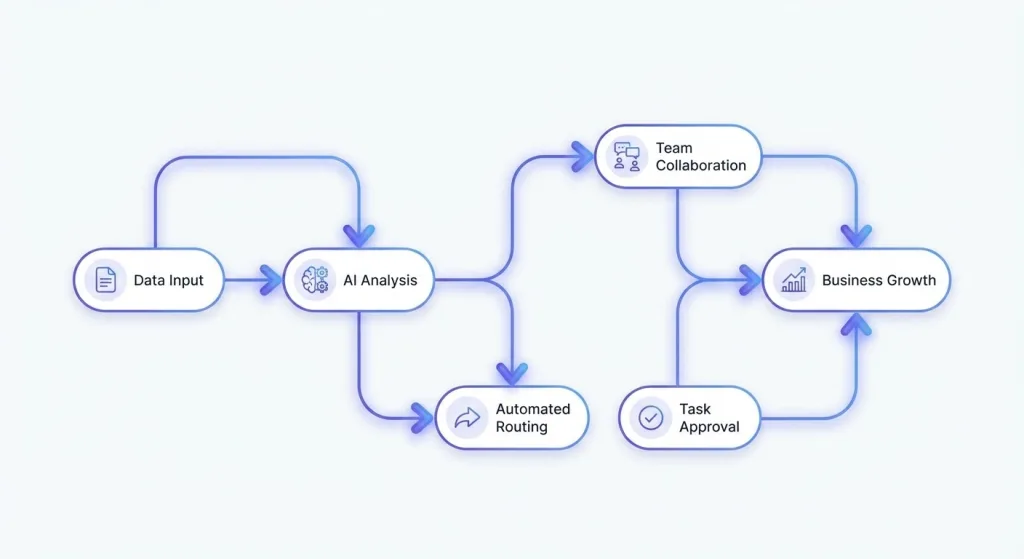
What an AI Consultant Actually Does (Step by Step)
An AI consultant looks at how your business runs, figures out which AI tools would save you time or money, sets those tools up, and trains your team to use them. That is the whole job.
In practice, it breaks down into six phases:
Phase 1: Operations audit. Before recommending anything, a good consultant needs to understand your actual day-to-day. What does your team spend time on? Where do things slow down? Which tasks happen the same way every time? This typically takes 2 to 5 hours depending on your business size.
Phase 2: Opportunity mapping. Not everything should be automated. Some tasks need human judgment. A good consultant will rank opportunities by ROI and tell you which 2 or 3 changes will make the biggest difference. If someone suggests automating everything, that is a red flag.
Phase 3: Tool selection. This is where it gets specific. You should hear exact tool names, monthly costs, and how each one connects to your existing software. Example: "Use Make.com ($16/month) to connect your CRM to ChatGPT, so every new lead automatically gets a personalized follow-up email drafted and queued for your review."
Phase 4: Setup and integration. Recommending a tool is easy. Getting it configured correctly, connected to your CRM or scheduling software, and actually producing useful output? That is where most DIY attempts fail. A consultant handles the technical wiring.
Phase 5: Team training. This is not a one-hour webinar with slides. Good training means hands-on walkthroughs where each team member practices with the actual tools on real tasks. It means written cheat sheets they can reference later. It means a follow-up session two weeks in to answer questions that only come up after real use.
Phase 6: Ongoing tuning. AI tools update constantly. New features ship monthly. Better alternatives appear. Your business changes. A retainer relationship keeps your AI stack current without you having to track every product update yourself.
What AI Consulting Is NOT
The term covers a huge range of services. Most of what you will find online does not apply to businesses under 500 employees.
It is not building custom AI models from scratch. That requires millions in R&D. Small businesses get 90% of the value from existing off-the-shelf tools like ChatGPT ($20/month), Make.com ($16/month), Jasper ($49/month), or Otter.ai ($17/month). No custom code needed.
Take our AI readiness checklist to see if you're ready.
Wondering about budget? See our guide on AI consulting cost for small business.
It is not hiring data scientists. If someone pitches you a team of machine learning engineers for your 15-person company, they are solving a problem you do not have.
It is not a PDF that collects dust. Some firms charge $10,000 for a strategy document and then disappear. If the consultant does not help you actually implement the recommendations, the report is expensive decoration. Always ask: "Is implementation included?"
Free AI Agent Audit
Turn AI consulting interest into a concrete roadmap
The audit gives you workflow priorities, tool-fit notes, and a 30-day implementation path instead of a generic strategy call.
- Choose the first workflow worth automating
- Check tool fit, data risk, and handoff gaps
- Leave with a focused 30-day implementation path
Do You Actually Need One?
The better question is not whether AI consulting is useful. It is whether outside help will get you to a working system faster than trial and error.
Start with a DIY stack if: your team is tiny, the workflow is simple, and the downside of a messy setup is low. In that case, a basic ChatGPT Plus account, a few documented prompts, and one simple automation can be enough to learn what is possible.
Bring in a consultant when:
Your team spends 10+ hours per week on repetitive tasks. Data entry, scheduling, customer follow-ups, report generation. AI can typically cut 30% to 60% of that time. But picking the right tools and connecting them to your existing systems takes expertise that is not worth building in-house.
You tried an AI tool and it did not stick. This happens constantly. The tool was probably fine. The implementation was the problem. Bad prompts, no integration with existing workflows, and no training usually kill adoption within a month.
You are in a regulated industry. Healthcare, finance, legal, and real estate all have compliance rules that affect which AI tools you can use and how data flows through them. A consultant who understands HIPAA, SOC 2, or state bar guidelines can prevent expensive mistakes.
You do not have time to research 5,000+ AI tools. New tools launch daily. A consultant who tracks this space full-time can save you months of trial-and-error by pointing you to the 2 or 3 tools that actually fit your workflow and budget. Our best AI tools for small business guide is a good starting point.
Free AI Agent Audit
Pressure-test your first AI workflow before you spend
Find the workflow with the clearest ROI, the risks to avoid, and the 30-day implementation path that makes the first project manageable.
- Choose the first workflow worth automating
- Check tool fit, data risk, and handoff gaps
- Leave with a focused 30-day implementation path
How to Vet an AI Consultant (5 Questions to Ask)
The market is young. There is no standard certification. Some "AI consultants" were social media managers six months ago. Here is how to separate signal from noise:
1. "Can you name the specific tools you would recommend for a business like mine?" If they give vague answers about "AI-powered solutions" instead of tool names and prices, move on.
2. "Is implementation included or just strategy?" Strategy-only engagements are fine if you have a technical team to execute. If you do not, you need implementation baked in.
3. "Do you have a financial relationship with any of the tools you recommend?" Tool-agnostic consultants recommend what is best for you. Ones getting affiliate commissions might not.
4. "What does your pricing look like?" If they will not give you a range before a sales call, that is a yellow flag. Pricing should be transparent.
5. "Can I talk to a past client?" References matter more than case studies on a website. Anyone can write a case study. Not everyone can produce a happy client willing to take your call.
Typical Price Ranges (So You Know What to Expect)
Quick reference so you are not walking in blind:
- Free or low-cost audit: $0 to $500. High-level review of your operations with top-line recommendations.
- Detailed audit with roadmap: $500 to $3,000. Specific tool recommendations, ROI projections, and a prioritized action plan.
- Implementation: $2,000 to $10,000. Tool setup, integrations, workflow automation, and team training.
- Ongoing advisory: $500 to $5,000/month. Optimization, new tool evaluation, and team support.
Big consulting firms (McKinsey, Deloitte) start at $150,000+. That is a different world. For small businesses with 5 to 100 employees, you should be looking at $2,000 to $10,000 total for audit plus implementation.
What Working With Us Looks Like
At Aslan Intelligence, we work with small and mid-size businesses - mostly in San Diego and across Southern California. Our focus is practical: existing AI tools, real implementation, and measurable results.
We start with a free strategy session where we review your operations and identify where AI would have the highest impact. No pitch deck. No 45-minute sales presentation. Just a straightforward conversation about what is possible and what is not.
If there is a fit, our paid engagements include a detailed audit ($997), implementation ($2,000 to $5,000), and optional monthly advisory ($1,000 to $3,000/month). Every price is fixed before we start. No surprises.
Free AI Agent Audit
Start with the workflow, not the AI hype
The audit shows which workflow should move first, what tool stack fits, and how to launch a 30-day implementation without buying the wrong software.
- Choose the first workflow worth automating
- Check tool fit, data risk, and handoff gaps
- Leave with a focused 30-day implementation path
Related AI consulting guides
If you are moving from the definition stage into implementation, these guides break the work into business-specific use cases.
- AI for accounting firms - workflow control for finance teams
- AI for nonprofits - responsible automation for lean teams
- AI sales agent for small business - lead response and follow-up automation
- AI agent with persistent memory - context-aware agent systems
- self-improving AI agent - how agent systems improve over time
Free AI Agent Audit
Get a practical AI implementation plan
Use the audit to pick the first workflow, estimate the operational upside, and decide whether consulting support is worth it for your team.
- Choose the first workflow worth automating
- Check tool fit, data risk, and handoff gaps
- Leave with a focused 30-day implementation path
Want a practical AI implementation plan?
If you are comparing AI tools, consultants, or automation ideas, book a free strategy call and we will map the highest-leverage workflows for your business.
Book a Free Strategy Call