
AI for accounting firms is no longer a vague innovation topic. It is now a practical operating question: which workflows should your firm automate, which tools are safe enough for client data, and how do you use AI without weakening professional judgment?
The answer is not to hand tax advice, audit conclusions, or client communication to a chatbot and hope for the best. The answer is to redesign the firm around better intake, cleaner document handling, faster review cycles, and smarter client service. Our research shows that the firms getting value from AI are not chasing every new model. They are building repeatable systems around the work that already slows their teams down.
That matters because the pressure on accounting firms is moving from novelty to execution. AICPA and CPA.com continue to frame AI as a major profession-level capability shift, while Thomson Reuters research on professional services shows AI adoption rising across tax, audit, accounting, legal, risk, and compliance teams. At the same time, IRS and tax data security guidance makes the boundary clear: convenience does not override confidentiality, client consent, access control, or professional responsibility.
In plain English: AI can help your firm move faster, but only if the implementation is built like an accounting workflow, not like a toy.
AI for Accounting Firms Starts With Workflow, Not Tools
Most firms approach AI backward. They ask, "Which AI tool should we buy?" The better question is, "Where does work get stuck?" Accounting firms usually lose time in predictable places: client intake, document requests, transaction categorization, invoice handling, month-end close support, tax workpaper preparation, email follow-up, proposal writing, engagement letter preparation, and internal knowledge search.
AI becomes useful when it is attached to those repeatable bottlenecks. A general chatbot can draft a paragraph. A real AI workflow can read a client request, classify it, ask for missing documents, route the task to the right team member, summarize the file history, and prepare a review-ready draft without exposing sensitive data to an unmanaged system.
That distinction is important. Accounting firms do not need more disconnected software tabs. They need controlled automation that fits the way partners, managers, preparers, bookkeepers, and admin staff already work. If the system creates more review burden than it removes, it is not automation. It is overhead with better marketing.
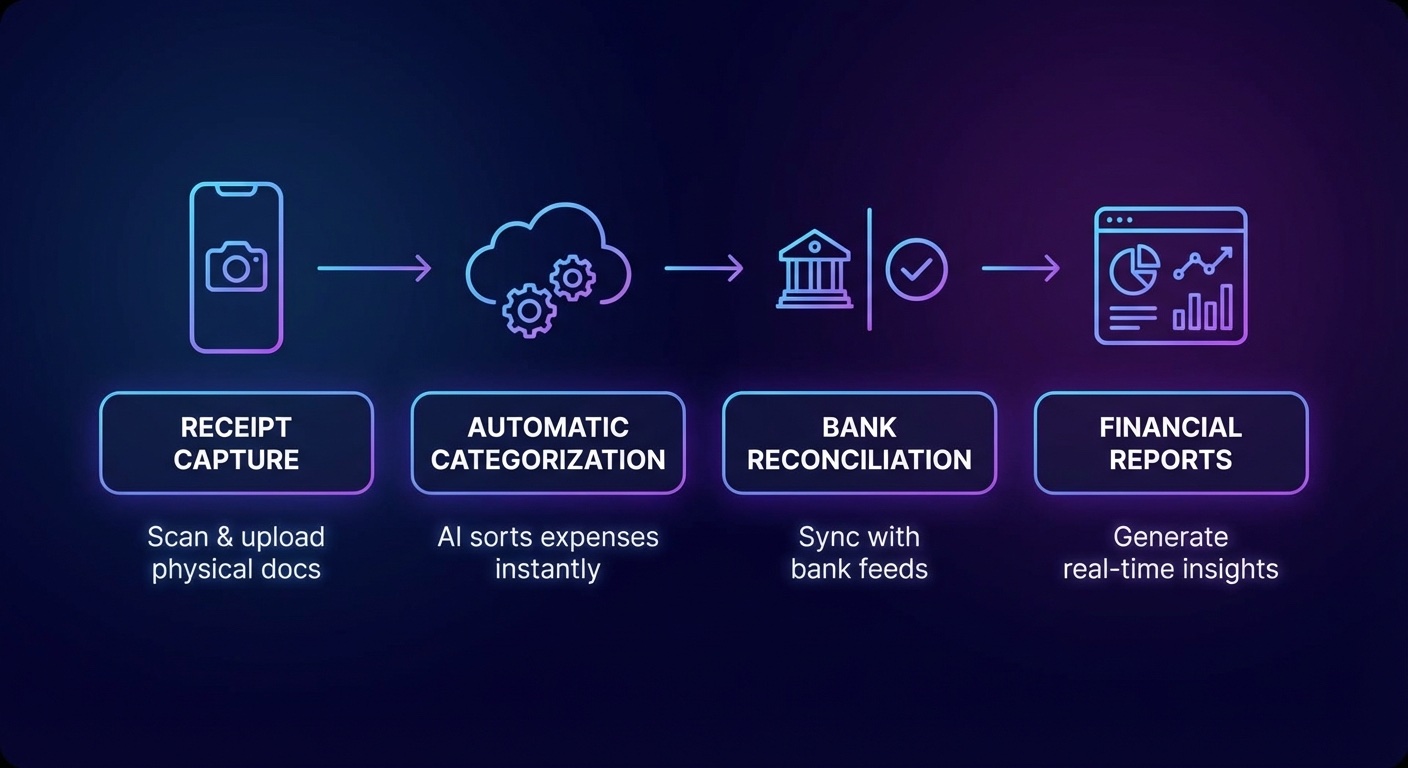
The strongest first use cases are usually operational, not advisory. Start with low-risk, high-frequency tasks where AI can create a draft, summary, checklist, or routing decision that a human still reviews. This gives the firm measurable time savings without letting AI make final accounting, tax, or compliance decisions on its own.
For example, a small or midsize firm can use AI to summarize new client onboarding forms, identify missing W-9s, draft polite follow-up emails, tag uploaded documents by type, and prepare a client-ready status update. None of that requires the model to decide a tax position. It simply removes friction from the process around the professional work.
Best Use Cases for AI for Accounting Firms in 2026
The most practical AI use cases for accounting firms fall into five categories: admin automation, bookkeeping support, tax workflow support, client communication, and firm knowledge management.
1. Client intake and document collection. AI can turn messy intake into structured work. Instead of staff manually reading every form, email, and portal message, an AI workflow can extract client names, entities, tax years, filing status, missing forms, deadlines, and special notes. It can then generate a checklist for staff review. This is especially valuable during tax season, when the cost of a missing document is not just time. It is rework, context switching, and client frustration.
2. Bookkeeping cleanup and categorization support. AI can assist with transaction descriptions, vendor normalization, duplicate detection, and unusual item flagging. This does not mean the system should auto-post every recommendation without review. It means the bookkeeper gets a cleaner queue and better context. If your firm already has bookkeeping workflows, our guide to AI for bookkeeping explains how to think about automation without losing control of the ledger.
3. Invoice and bill processing. Many firms still touch invoices too many times. AI can extract vendor, amount, due date, line items, tax, department, approval status, and exceptions from PDFs or email attachments. It can route the invoice, flag mismatches, and prepare the accounting entry for review. For a deeper breakdown, see our guide to AI invoice processing.

4. Tax return preparation support. AI can summarize prior-year notes, compare current-year documents to prior-year document lists, draft internal questions, and identify missing items. It can also help prepare first-pass explanations for reviewer attention. The key phrase is support. AI should not independently determine filing positions, sign returns, or generate client advice without professional review.
5. Client communication and advisory follow-up. Firms often have valuable recommendations buried in workpapers, review notes, and partner calls. AI can help convert those insights into clear client summaries, follow-up agendas, renewal notes, and advisory prompts. This is where AI starts to support revenue, not just efficiency. A firm that follows up faster and explains issues more clearly can create a better client experience without adding headcount.
6. Internal research and knowledge search. Accounting teams waste time searching prior client answers, firm templates, policy documents, and software procedures. A private knowledge system can answer questions from approved internal material: how to handle a specific onboarding step, which checklist applies to a service line, what the firm's client communication standard says, or where the latest template lives.
These use cases are not flashy, but they are profitable. They reduce manual work, shorten turnaround time, and make the firm easier to manage.
Book a Free Strategy Call if you want a practical AI workflow map for your accounting firm. We can help identify the first automations worth building before you spend money on another platform.
What AI Should Not Do Inside an Accounting Firm
AI is powerful, but the wrong implementation can create real risk. Accounting firms handle confidential financial data, tax information, Social Security numbers, payroll details, bank records, entity documents, and sensitive business facts. That changes the standard.
The IRS has emphasized AI governance, privacy, and trustworthy use in its own policy environment, and tax professionals remain bound by confidentiality duties, data protection expectations, and professional standards. AICPA risk guidance also warns firms to understand tool terms, privacy policies, data use, and incident exposure before uploading client information. The lesson is simple: do not put client data into consumer AI tools unless the firm has reviewed the security, contract terms, retention settings, and legal responsibilities.
Here are the lines accounting firms should draw early:
- Do not upload raw tax returns, Social Security numbers, payroll files, bank statements, or confidential client records into unmanaged public AI tools.
- Do not let AI produce final tax advice without human review by a qualified professional.
- Do not use AI-generated citations, numbers, or legal references without verification from authoritative sources.
- Do not let staff create shadow AI workflows outside firm policy.
- Do not automate client communication in a way that sounds final when it still needs professional approval.
The best firms will not be the ones that ban AI completely. They will be the ones that create a clear policy: approved tools, approved data types, review requirements, retention rules, escalation steps, and training. A simple policy beats silent experimentation every time.
How to Build a Safe AI Implementation Plan
A good implementation plan should be boring in the best way. It should be specific, measurable, and easy to audit.
Step one: map the workflow. Pick one workflow, not the entire firm. For example: new monthly bookkeeping client onboarding, 1040 document collection, invoice processing for outsourced accounting clients, or client follow-up after review notes. Document every step, handoff, system, delay, and recurring error.
Step two: classify the data. Identify what information the workflow touches. Is it public, internal, confidential, tax return information, payroll data, banking data, or personally identifiable information? This determines what AI tools can be used and what controls are required.
Step three: choose the automation type. Not every workflow needs generative AI. Some tasks need rules, templates, OCR, routing logic, or API connections. Generative AI is best when the task involves language, summarization, classification, extraction, or first-draft communication. Traditional automation is often better for deterministic steps like moving files, assigning tasks, updating records, and sending reminders.
Step four: keep humans in the review loop. The first version should create drafts, summaries, and recommendations for staff review. Once the firm has evidence that the workflow is accurate and safe, more steps can be automated. This staged approach protects quality and helps skeptical team members trust the system.
Step five: measure the result. Track time saved, rework reduced, response time improved, missing document rates, client satisfaction, realization, and reviewer notes. If the firm cannot measure the before and after, it cannot know whether AI is actually helping.
This is the same operating logic behind broader AI automation for small businesses: start with bottlenecks, build controlled workflows, measure the impact, then expand.
The ROI Case for AI in Accounting Firms
The business case is strongest when AI improves capacity without lowering standards. Many firms are not trying to replace accountants. They are trying to protect skilled staff from repetitive work, reduce turnaround delays, and give partners more operating capacity.
Thomson Reuters research has repeatedly pointed to rising AI adoption across professional services, but it also highlights a gap between using AI and capturing value from it. That gap is real. A staff member using a chatbot to rewrite an email is adoption. A governed workflow that cuts document chase time, improves review packets, and increases client responsiveness is value.
For accounting firms, the highest ROI usually comes from time recovered in peak periods. If AI reduces the number of touches per client, decreases review back-and-forth, or helps staff handle more cleanly prepared work, the firm can improve margins without simply asking people to work longer hours. That matters in an industry where talent pressure, seasonal overload, and client expectations are all moving in the wrong direction.
There is also a client experience angle. Clients do not judge the firm only by technical competence. They judge responsiveness, clarity, reminders, portals, status updates, and whether they have to ask the same question twice. AI can help firms communicate like a larger operation while keeping the judgment of a professional practice.
What to Automate First
If your firm is starting from zero, do not begin with the most complex tax or audit judgment. Begin with a workflow that is repetitive, visible, and painful.
Good first projects include:
- New client intake summaries and missing document checklists.
- Monthly bookkeeping close packet preparation.
- Invoice extraction and approval routing.
- Client email draft generation for routine status updates.
- Prior-year document comparison for tax organizers.
- Internal SOP search across firm procedures and templates.
A poor first project is anything with vague ownership, unclear data permissions, no review process, or no baseline metric. AI does not fix a broken workflow. It usually exposes it faster.
AI for Accounting Firms Is a Management Decision
The firms that win with AI will treat it as an operating system upgrade, not a software experiment. Partners need to decide what the firm will automate, what it will never automate, which tools are approved, how staff should use them, and how quality will be reviewed.
Managers need practical playbooks. Staff need training that explains what is allowed, what is risky, and how AI fits into their daily work. Clients need the benefit of faster service without wondering whether their private information is being exposed to unmanaged tools.
That balance is where the opportunity is. AI for accounting firms should reduce repetitive admin, improve consistency, and help professionals spend more time on judgment, advisory work, and client relationships. It should not turn the firm into an unreviewed content machine.
The data suggests that AI adoption in professional services will keep accelerating. The question is whether your firm captures that value intentionally or lets scattered tool usage create risk without measurable return.
Book a Free Strategy Call to map the safest AI automation opportunities inside your accounting firm. We will help you find the workflows worth automating first, define the controls, and build a practical rollout plan.