
AI for bookkeeping is no longer just a promise inside accounting software demos. In 2026, the useful version is much more practical: it helps categorize transactions, match receipts, flag missing documents, speed up reconciliation, draft reports, and give owners faster visibility into cash flow. The mistake is expecting it to replace bookkeeping judgment. The better move is to use AI as the first pass, then keep a human review layer around anything that affects taxes, cash, payroll, or financial decisions.
That distinction matters because bookkeeping is not just data entry. Good books support tax returns, lender conversations, owner decisions, payroll accuracy, and profitability analysis. The IRS says business records should clearly show income and expenses, and supporting documents like invoices, receipts, deposit slips, paid bills, and canceled checks matter because they support entries in the books and on the tax return. AI can help organize that evidence, but it cannot make the evidence real if the business never captured it.
Our research shows the strongest AI bookkeeping setups are not built around one flashy chatbot. They combine accounting software, bank feeds, document capture, rules, review queues, and management reporting. QuickBooks, for example, describes automated bookkeeping that learns how a business categorizes income and expenses, then suggests matches and categories for bank transactions. Xero positions automated reconciliation around reviewing, coding, and reconciling bank transactions so balances and reports stay current. Those are useful capabilities, but they still need controls.
AI for Bookkeeping Works Best as a Review System
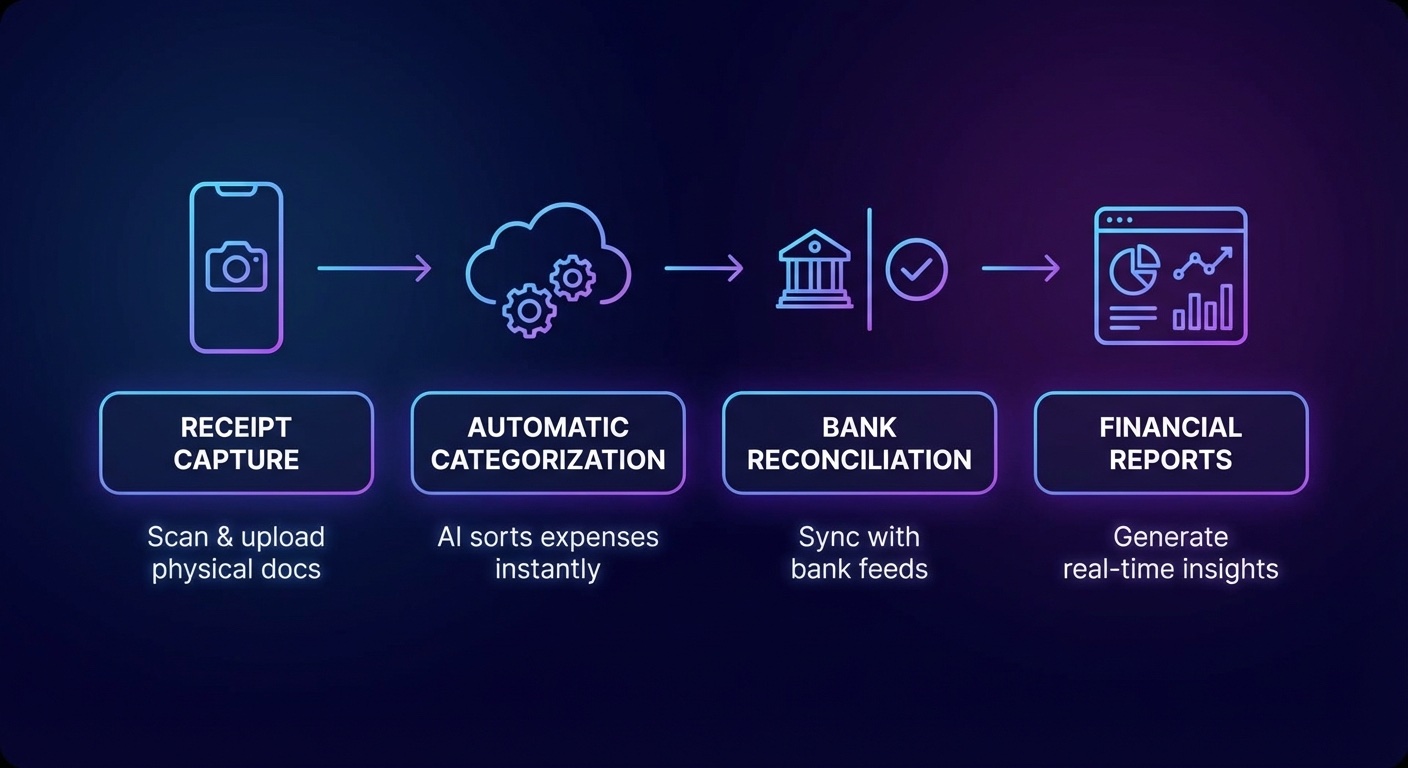
The best way to think about AI for bookkeeping is simple: AI prepares, humans approve. A clean workflow starts when transactions, bills, receipts, invoices, and payment records flow into one system. AI looks at the vendor name, amount, memo, previous behavior, category history, and source document. It recommends a category, suggests a match, or routes the item into an exception queue when confidence is low.
This is where the value shows up. Instead of a bookkeeper manually touching every recurring software subscription, card charge, ACH payment, and invoice, the system can handle predictable work first. The human reviewer spends time on ambiguous items: owner draws, loan payments, reimbursable expenses, split transactions, unusual vendors, uncategorized deposits, sales tax, payroll liabilities, and anything that does not fit the normal pattern.
That changes the job from typing to quality control. It also makes the month-end close less chaotic. When bank transactions are reviewed weekly, receipts are captured as they happen, and exceptions are visible in a queue, the business is not trying to reconstruct an entire month from memory.
For many small businesses, this is the first real win. Faster bookkeeping means owners can see margin problems, cash constraints, unpaid invoices, and expense creep while there is still time to act. Late books are backward-looking. Current books are operational.
For related automation planning, start with our guide to AI automation for small businesses. Bookkeeping is often one of the first workflows worth tightening because it touches cash, reporting, and decision quality every month.
Where AI for Bookkeeping Saves the Most Time
AI bookkeeping is strongest in repetitive, rules-heavy workflows where the source data is digital and the business has consistent patterns. It is weakest when the input is messy, the chart of accounts is poorly designed, or the business expects software to solve unclear financial policy.
The highest-return areas are usually these:
- Transaction categorization: AI can suggest expense and income categories based on vendor names, bank descriptions, prior coding, and transaction patterns.
- Receipt and bill capture: Document tools can extract vendor, date, amount, tax, and line-item information from receipts and invoices, then attach the document to the transaction.
- Bank reconciliation: AI can suggest matches between bank feed items and existing invoices, bills, deposits, or payments, reducing manual matching work.
- Duplicate detection: Systems can flag duplicate bills, repeated reimbursements, unusual payments, or transactions that look inconsistent with normal activity.
- Accounts receivable follow-up: AI can help draft polite payment reminders, prioritize overdue accounts, and surface customers with changing payment behavior.
- Management reporting: AI can summarize trends in expenses, revenue, gross margin, cash flow, and category movement for owner review.
None of this requires a business to rip out its accounting stack. In many cases, the smarter path is to improve the system already in place. If QuickBooks, Xero, Hubdoc, Bill, Dext, Gusto, Stripe, Square, or a bank feed is already part of the operation, the first question is not "What new AI tool should we buy?" The first question is "Which manual bookkeeping steps are still happening because the current setup is underused or badly configured?"
AI for Bookkeeping Still Needs Human Review
The biggest risk in AI bookkeeping is not that the software will make a single mistake. The bigger risk is that the business quietly approves hundreds of small errors because the dashboard looks confident. Bookkeeping errors can compound. A wrong category affects reporting. A missed receipt weakens tax support. A duplicate bill affects cash. A miscoded loan payment can distort both the balance sheet and profit and loss statement.
Human review should stay mandatory in several areas:
- Tax-sensitive categories: Meals, travel, vehicle expenses, contractor payments, depreciation, owner compensation, and reimbursements need careful treatment.
- Payroll and benefits: Payroll liabilities, reimbursements, bonuses, benefits, and contractor classifications should not be blindly automated.
- Loan and financing transactions: Principal, interest, fees, merchant cash advances, credit lines, and owner contributions can be easy to misclassify.
- Revenue recognition: Deposits, retainers, refunds, deferred revenue, and platform payouts often need business-specific logic.
- New vendors and unusual activity: AI is better with patterns than exceptions. New vendors deserve review until the pattern is clear.
This is why AI for bookkeeping should include approval thresholds. High-confidence recurring charges can be auto-suggested or auto-coded after review rules are proven. Medium-confidence items should be queued. Low-confidence items should require explanation, source documents, or accountant review. The goal is not maximum automation. The goal is controlled automation.
If your current process is invoice-heavy, our guide to AI invoice processing breaks down the document side of this workflow in more detail. Invoice capture is often the easiest place to find immediate savings because the pain is visible and the rules are concrete.
What a Practical AI Bookkeeping Stack Looks Like
A practical AI bookkeeping stack has four layers. The accounting ledger is the source of truth. The document capture layer collects receipts, bills, statements, contracts, and supporting evidence. The automation layer applies rules, matches transactions, and routes exceptions. The reporting layer turns clean data into decisions.
For a small business, that might look like QuickBooks Online or Xero as the ledger, a receipt capture tool for bills and documents, a payroll system, bank and credit card feeds, and a simple reporting dashboard. For a larger service business, it might include approval workflows, project-level cost tracking, inventory integrations, CRM-to-invoice automation, and role-based permissions.
The chart of accounts is the hidden foundation. If the categories are vague, duplicated, or overloaded, AI will learn bad patterns. Before adding more automation, clean the chart of accounts. Decide how revenue should be grouped, how direct costs should be separated from overhead, which expenses need department or project tracking, and what the owner actually wants to see each month.
Then build rules around the boring recurring items. Software subscriptions, rent, insurance, utilities, bank fees, standard merchant fees, recurring contractor payments, and predictable loan payments can often be handled with tight automation rules. The exceptions should become the review list.
That review list is where management value lives. If a vendor payment is larger than usual, a customer paid late, gross margin slipped, a category spiked, or cash is tighter than expected, the system should surface it. AI should not only help close the books. It should help the owner understand what changed.
If you want an outside view on where AI belongs in your finance workflow, Book a Free Strategy Call. We can help map the bookkeeping process, identify the highest-impact automations, and separate useful AI from unnecessary software spend.
How to Evaluate AI Bookkeeping Tools
Do not evaluate AI bookkeeping tools by their demos alone. Demos usually show clean data, perfect receipts, obvious categories, and ideal workflows. Real businesses have missing invoices, mixed-use expenses, payment processor fees, vendor name changes, owner reimbursements, messy sales deposits, and exceptions that do not fit the demo path.
Use a practical scorecard instead:
- Accounting integration: Does it integrate with the ledger through supported connections, or does it depend on fragile exports and imports?
- Audit trail: Can you see who approved a transaction, what changed, and which source document supports the entry?
- Confidence controls: Can the system separate high-confidence suggestions from items that need manual approval?
- Document handling: Can it attach receipts, bills, and invoices to the right transaction?
- Permission design: Can owners, bookkeepers, accountants, and operators have different access levels?
- Exception reporting: Does it show what needs attention, or does it hide uncertainty behind a clean dashboard?
- Exportability: Can your accountant get the information needed for tax prep, review, or cleanup without begging the vendor?
Security also matters. Bookkeeping tools touch bank data, vendor records, payroll-adjacent information, customer payments, tax documents, and financial statements. Use tools with strong access controls, multi-factor authentication, clear permissions, and a real process for revoking access when employees or contractors change roles.
AI for Bookkeeping Implementation Plan
A good implementation does not start with software. It starts with the current close process. How do transactions enter the books? Who approves bills? Where are receipts stored? Which reports does the owner actually read? How long after month-end are financials reliable? Which categories cause the most cleanup? Which questions does the accountant ask every quarter?
Once that is clear, build the system in phases.
- Clean the foundation: Fix the chart of accounts, bank feeds, permissions, vendor records, and document storage.
- Automate the obvious: Apply rules to recurring, low-risk transactions and route exceptions for review.
- Add document capture: Make receipts and invoices part of the workflow instead of a month-end scavenger hunt.
- Build review thresholds: Decide which categories can be suggested, which can be auto-coded, and which always require approval.
- Create owner reports: Turn clean books into a monthly view of revenue, margin, cash, receivables, payables, and unusual changes.
- Review monthly: Compare AI suggestions against human corrections and adjust rules based on real errors.
This phased approach keeps the business from over-automating too early. It also makes mistakes easier to catch. If the first phase is messy, adding more AI only makes the mess faster.
For businesses comparing general AI tools, our article on AI tools for small business accounting gives a broader view of software categories and where they fit. The bookkeeping layer should support the accounting strategy, not become a disconnected side system.
Who Should Use AI for Bookkeeping Now?
AI for bookkeeping makes the most sense for businesses with enough transaction volume to feel the pain, but not so much complexity that they need a custom finance system from day one. Local service businesses, agencies, healthcare practices, e-commerce operators, professional services firms, construction companies, real estate teams, and multi-location small businesses can all benefit if the workflow is designed correctly.
The strongest fit is a business that already has digital payments, recurring expenses, bank feeds, invoices, and a monthly reporting rhythm. The weakest fit is a business with poor source documents, unclear responsibilities, inconsistent owner behavior, and no appetite for reviewing exceptions. AI will not fix process discipline by itself.
That is the real conclusion. AI for bookkeeping can save time, improve consistency, and help owners see financial signals earlier. But the best systems are boring in the right way. They capture documents, standardize categories, automate recurring work, flag exceptions, preserve audit trails, and keep humans in control of judgment-heavy decisions.
If your bookkeeping process still depends on late receipts, manual categorization, and month-end guessing, Book a Free Strategy Call. We will help you find the practical AI opportunities, build the review controls, and turn bookkeeping from a cleanup chore into a better operating system for the business.