
Why AI tools for small business accounting are worth your attention
If you run a small business and handle your own books, you already know the drill. Receipts pile up, invoices go out late, and tax season turns into a three-week headache. According to CSI Accounting, small business owners who manage billing in-house spend up to 25 hours per month on accounting tasks alone. That is time not spent on clients, sales, or growth.
The good news: AI tools for small business accounting have matured significantly. These are not gimmicks. They handle the repetitive work - categorizing transactions, scanning receipts, matching invoices - so you can focus on running the business. And according to a QuickBooks AI Survey, 83% of small businesses already use AI at work, with 65% wanting to expand their use further.
This guide breaks down the tools worth your attention, what each one actually does, and how to think about integrating them without disrupting what already works.
The accounting tasks AI handles best
Before picking a tool, it helps to know where AI has the most impact in accounting workflows:
- Transaction categorization: AI learns your spending patterns and automatically sorts income and expenses into the right buckets.
- Receipt and document capture: Snap a photo of a receipt and AI extracts the vendor, date, and amount - no manual entry.
- Invoice processing: AI reads supplier invoices, matches them to purchase orders, and flags anomalies before payment.
- Cash flow forecasting: Based on historical patterns, AI projects when you will run short or have surplus cash.
- Expense reconciliation: Bank feeds sync automatically, and AI matches transactions to existing records.
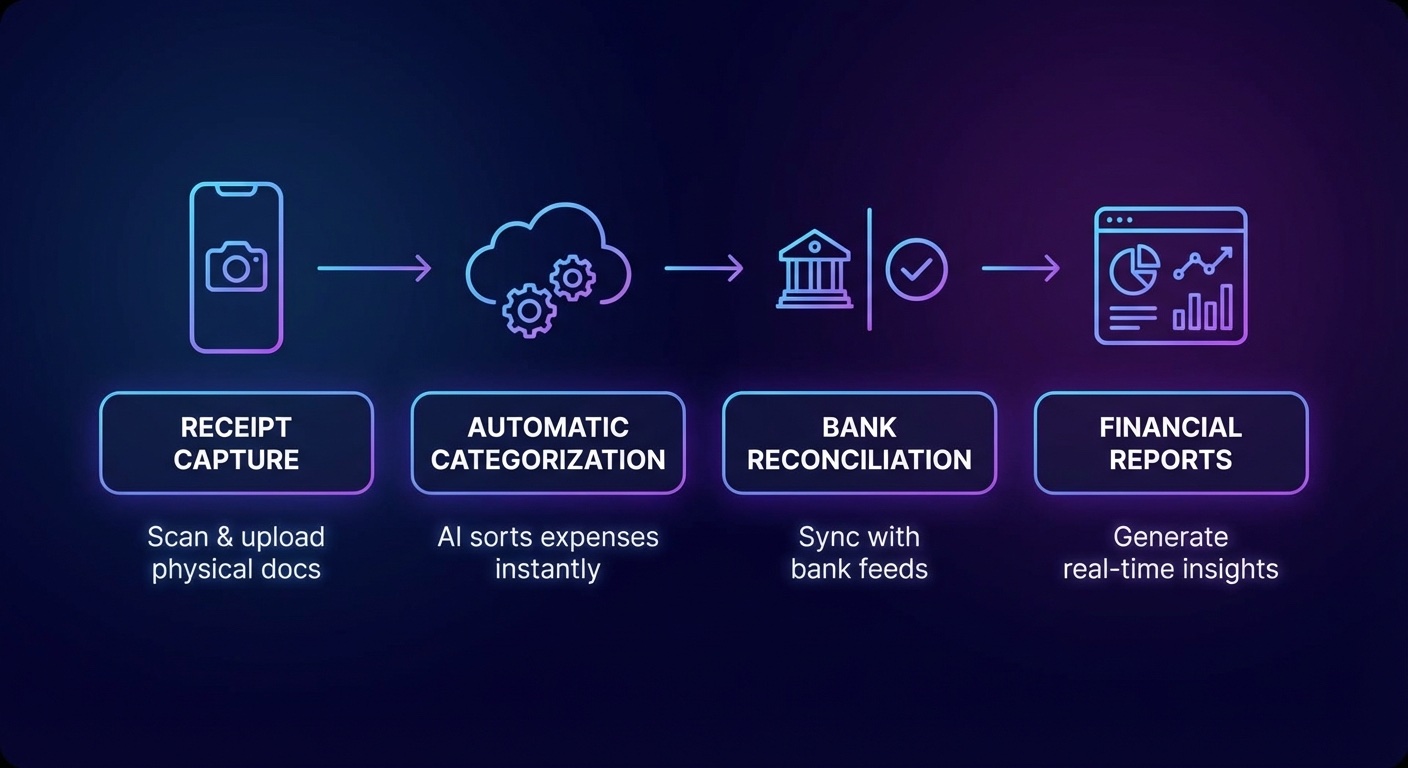
The tools below each focus on one or more of these areas. None of them replace a good accountant or CPA for complex decisions - but they significantly reduce the hours spent on mechanical data work.
Spending Too Much Time on Bookkeeping?
Book a free 30-minute strategy call. We will map the specific accounting tasks you can automate this month.
The best AI tools for small business accounting in 2026
QuickBooks Online with Intuit Assist
QuickBooks remains the most widely used accounting platform for small businesses, and Intuit has been steadily building AI capabilities into the core product rather than offering them as add-ons. The key AI features include automatic transaction categorization (the system learns how you classify expenses and applies that logic going forward), smart receipt scanning, and predictive cash flow insights.
Intuit Assist, the company's AI layer, can answer plain-language questions about your financials - things like "how much did I spend on contractors last quarter" - and generate basic reports on demand. When paired with a document capture tool like Dext, QuickBooks becomes a more complete accounting automation setup.
Best for: Businesses already on QuickBooks who want AI features without switching platforms.
Pricing: QuickBooks Online plans start at $35/month. Intuit Assist is included in higher tiers.
Dext (formerly Receipt Bank)
Dext specializes in one thing: getting financial documents into your accounting system without manual data entry. You photograph receipts, forward supplier emails, or connect bank feeds - Dext's AI extracts the relevant data and pushes it to QuickBooks, Xero, or FreshBooks automatically.
For businesses that deal with a high volume of receipts (field teams, restaurants, retail), Dext removes one of the most tedious parts of bookkeeping. The accuracy rate on document extraction is high enough that most entries go through without any human review.
Best for: Businesses with lots of receipt volume or remote teams submitting expenses.
Pricing: Plans start around $20/month for sole traders; business plans vary by transaction volume.
FreshBooks
FreshBooks is built for service-based small businesses and freelancers. Its AI features are integrated throughout rather than bolted on: automated expense categorization, smart invoice creation based on tracked time, and late payment predictions that tell you which clients are likely to pay late based on their history.
The platform also supports double-entry accounting for businesses that need that level of rigor, and it generates profit and loss statements, balance sheets, and tax summaries without requiring accounting knowledge to interpret them.
Best for: Freelancers, consultants, and service businesses that invoice clients regularly.
Pricing: Plans start at $19/month for basic features.
Vic.ai
Vic.ai targets businesses dealing with high volumes of supplier invoices. Its AI reads invoices, extracts line items, matches them against purchase orders, and routes them for approval - all without human intervention on standard transactions. The system flags anything that does not match expectations for human review.
This is particularly useful for businesses that process dozens or hundreds of invoices per month, where manual processing creates bottlenecks and introduces errors. Vic.ai integrates with major ERP and accounting systems.
Best for: Businesses with significant accounts payable volume and existing accounting software.
Pricing: Enterprise pricing, typically quoted based on invoice volume.
Botkeeper
Botkeeper combines AI automation with a team of human bookkeepers who review and verify the work. It handles transaction categorization, bank reconciliation, financial reporting, and payroll data - and delivers reviewed financials each month.
The model sits between fully automated tools and traditional bookkeeping services. The AI handles the mechanical work; human oversight catches the edge cases. For businesses that want automation without fully trusting a machine with their books, Botkeeper offers a middle path.
Best for: Businesses wanting AI efficiency with human verification as a backstop.
Pricing: Starts around $399/month, scaling with transaction volume.
Xero with AI add-ons
Xero is a strong QuickBooks alternative with its own AI-driven features: automated bank reconciliation, predictive analytics, and a marketplace of third-party tools that extend its capabilities. Tools like Syft Analytics layer on top of Xero to provide AI-powered financial reporting and forecasting.
If you are outside the US or want more flexibility in your accounting stack, Xero is worth considering. It has strong multi-currency support and integrates well with inventory and e-commerce platforms.
Best for: International businesses, e-commerce sellers, or those who want a QuickBooks alternative.
Pricing: Plans start at $29/month.
How to choose the right AI accounting tool
The right tool depends on where your accounting friction actually is. A few questions that help narrow it down:
- Where does time go? If receipt management is the bottleneck, start with Dext. If invoice processing is the problem, look at Vic.ai. If you need an all-in-one platform, QuickBooks or FreshBooks makes more sense.
- What do you already use? If you are on QuickBooks, add AI features there before switching platforms. If you are on a spreadsheet, moving to an AI-native platform like FreshBooks will have a bigger impact.
- How much trust do you want to hand over? Fully automated tools like Botkeeper (with human review) offer more oversight. Pure AI tools move faster but require more spot-checking early on.
- What is your transaction volume? Higher volume businesses get more ROI from automation. If you have 10 transactions per month, the investment may not be worth it yet.
If you want to explore AI tools beyond accounting, our guide to free AI tools for small business covers options across marketing, customer service, and operations. And for a broader view of what is available, the roundup of best AI tools for small business owners is worth reading.
Setting realistic expectations
AI accounting tools save time on mechanical tasks. They do not eliminate the need for judgment. You still need to review financials periodically, catch edge cases the AI misses, and make strategic decisions about cash flow and tax planning.
The data suggests that businesses using AI for accounting see the biggest gains in the first 60-90 days as the system learns their patterns. After that, most users report spending 30-50% less time on bookkeeping tasks compared to fully manual processes (based on vendor-reported user data from QuickBooks and FreshBooks).
The other common mistake is trying to automate everything at once. A better approach: identify the single most time-consuming accounting task, automate that, and add from there. Most businesses start with receipt capture or bank reconciliation - both are low-risk and immediately visible.
If you are evaluating broader AI adoption for your business, our breakdown of how to use ChatGPT for business covers how AI language tools fit alongside accounting automation in a practical workflow.
What most small business owners get wrong
The most common mistake is treating AI accounting tools like a set-and-forget solution. They are not. The first month requires active involvement: reviewing what the AI categorizes, correcting errors, and teaching the system your preferences. After that initial investment, the automation kicks in properly.
The second mistake is choosing a tool based on features rather than workflow fit. A tool with 40 features you will not use is less valuable than a simpler one that solves your actual bottleneck. Start by writing down the three accounting tasks that consume the most time or cause the most errors. Then match a tool to those specific problems.
The third mistake is underestimating integration requirements. Most AI accounting tools need to connect to your bank, your existing software, and sometimes your payroll provider. Before committing, check that the integrations you need actually exist and that setup is not a multi-week project.
Ready to Stop Doing Accounting Manually?
We help small businesses identify exactly which accounting tasks to automate and which tools fit their current setup. No generalist advice - just a practical plan built around your numbers.
AI tools for specific accounting functions
Beyond all-in-one platforms, there is a growing category of AI tools that handle one accounting function exceptionally well. These are worth knowing even if you already use QuickBooks or FreshBooks:
Keeper Tax targets freelancers and self-employed individuals specifically. Its AI scans your bank and credit card transactions to find potential tax deductions you may have missed. The system flags business-related expenses and helps you organize records before filing. For solopreneurs who mix personal and business spending, this removes one of the most error-prone parts of tax prep.
Melio adds AI-assisted accounts payable to any accounting setup. It handles bill payment scheduling, vendor management, and cash flow visibility around upcoming obligations. When cash is tight, Melio helps you sequence payments to protect your credit while maintaining vendor relationships.
Synder is built for e-commerce businesses that sell across multiple channels. It syncs transaction data from Shopify, Stripe, PayPal, Amazon, and others into QuickBooks or Xero automatically - correctly categorizing each transaction type, including refunds, fees, and taxes. For multi-channel sellers, this eliminates one of the most tedious reconciliation jobs in small business accounting.
Choosing between these point solutions and an all-in-one platform comes down to complexity. If your accounting needs are straightforward, a platform like FreshBooks or QuickBooks covers 80% of the work. If you have specific high-volume pain points - lots of invoices, multi-channel e-commerce, or heavy receipt volume - adding a point solution alongside your main platform often makes more sense than switching everything.

Building toward a fully automated accounting stack
The end goal for most small businesses is an accounting workflow where the day-to-day mechanical work runs on its own, and you only review exceptions and make decisions. That is achievable. The data suggests it typically takes two to four months to get there, depending on transaction complexity and how many integrations are involved.
A practical sequence for most businesses:
- Start with your accounting platform (QuickBooks, FreshBooks, or Xero) and enable all built-in AI features.
- Connect your bank feeds and let the AI run for 30 days, reviewing and correcting categorizations as you go.
- Add a receipt capture tool (Dext or similar) to handle physical and emailed documents.
- Set up automated reporting so you get a weekly or monthly financial summary without generating it manually.
- Identify what remains manual after 60 days. If it is high volume, find a point solution. If it is judgment-based, that is where your accountant earns their fee.
This approach keeps the implementation manageable and gives each layer time to stabilize before adding the next. Businesses that try to implement everything simultaneously often end up with integration problems that take weeks to sort out.